
400 - Unable to decrypt the password.
400 - Request was malformed.
Additional details may be provided in the response, such as a required field being missing.
400 - Server is disabled. Enable server before use.
400 - IpAddress information incomplete.
400 - Invalid tenantId entered.
400 - Unsupported transport type.
400 - Cross-tenant is not enabled for this tenant.
400 - Cross-tenant is not enabled for this server.
400 - Invite already received.
401 - Invalid token.
You aren't authenticated to call MESS. The token required may be a server token or an Entra token, depending on the endpoint you are calling. Additionally, the app ID required for acquiring the token also depends on the endpoint you are calling. Use the MCEDU client app id for server/register and the admin tooling app id for the tooling/ endpoints.
403 - Server is not available in your tenant.
403 - Dedicated Server is not enabled for this tenant.
A user with access will need to call the tooling/edit_tenant_info endpoint to enable the feature.
403 - Server does not allow connections from calling tenant.
403 - Missing or incorrect password.
403 - Requires admin-level permissions.
The user doesn't have permission to register a server. One of the following is true:
403 - Insufficient partner permissions.
The user does not have the partner role necessary to configure the given server of the target tenant.
403 - Must be server owner to perform request.
404 - Resource(s) not found.
404 - Server(s) not found.
404 - Tenant-specific server information not found.
While the resource may exist, you don't have the resource in your tenant. For example, if another tenant owns a server, but you don't have a guest registration in your tenant.
404 - Server hosting information not found. Server may not be online.
To bring the server back online, the server needs to call the server/host endpoint.
404 - Server invite not found.
Download the dedicated server sample tooling Jupyter Notebook from here: https://aka.ms/MCEDU-DS-Tooling
Use admin privileges when installing py.exe and Add python.exe to PATH options.Disable path length limit option once the installer reaches the Setup was successful page.Jupyter VS Code extension.Install on the pop-up asking if you want to install the recommended Python extension.py -m ensurepip followed by pip install msal in the VS Code terminal.py command cannot be found, you can try substituting it with python or python3. Which command to use is dependent on your system and the Python installation you have.pip command cannot be found, you can instead try py -m pip install msal.py -V in the VS Code terminal. Make note of the Python version number printed.Acquire Entra ID tokens.py -V.ipykernel package when prompted to do so by VS Code.Acquire Entra ID tokens code cell prints output like "To sign in, use a web browser to open the page https://microsoft.com/devicelogin and enter the code BTYG8SLBG to authenticate." Authenticating will provide the Jupyter Notebook with the Entra ID tokens needed to execute the other code cells. The tokens will persist until they expire or the Jupyter Notebook is exited.The following page describes how to find your tenant id: https://learn.microsoft.com/en-us/entra/fundamentals/how-to-find-tenant
Improve TOC to allow toggling between deepest levels shown.
For the purpose of dynamically spinning up on demand, how do we want to solve for tooling calling server/fetch_joiner_info or a similar endpoint? If the tooling were to call that endpoint as currently implemented, it would flush the joiner info returned.
To prevent flushing before the server is spun up when tooling is just checking whether to spin it up in the first place, we could have a tooling/peek_joiner_info that doesn't flush the joiner data.
We could also split server/fetch_joiner_info into ...fetch... and ...flush..., where the former doesn't flush and the latter doesn't fetch.
Another alternative would be to have the tooling proxy the fetched joiner info to the server once the tooling has spun up the server, but how would that work? Also, that would put additional work on the customers setting up the tooling.
Finally, what kind of status do we want to build into the flow to allow for any extra delay time it takes to spin up the server?
Servers can be designated as "broadcasted" in the tenant settings. Broadcasted servers are visible to all users in a tenant by default. Servers that are not broadcasted are hidden and must be manually added to the server grid in the client's "Servers" menu using the "+ ADD SERVER" button shown below.
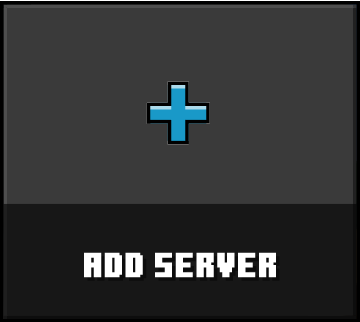
The client/check_server_access endpoint verifies whether the client has access to a specific server. If access is granted, the client caches the server ID locally. The client/fetch_server_info endpoint can be used to retrieve details for two types of servers: those that are broadcasted to all users by the tenant, and those that the client has manually added and cached locally on the device.
Manually added servers are cached locally, so users will need to re-add them when using a different machine.
Example request:
{
    "method": "POST",
    "endpoint": "/client/check_server_access",
    "headers": {
        "Host": "https://dedicatedserver.minecrafteduservices.com",
        "Authorization": "Bearer {Entra Access Token}" // Replace {Entra Access Token} with yours
    },
    "body": {
        "serverId": "6VQEFN5BNSGC" // <string - Server ID> The globally unique 12 digit alphanumeric case-insensitive ID of the server (conventionally written with uppercase letters for consistency)
    }
}
Example 200 response:
{
    "response_code": "200",
    "headers": {},
    "body": {}
}400 - Request was malformed.
Additional details may be provided in the response, such as a required field being missing.
401 - Invalid token.
You aren't authenticated to call MESS. The token required may be a server token or an Entra token, depending on the endpoint you are calling. Additionally, the app ID required for acquiring the token also depends on the endpoint you are calling. Use the MCEDU client app id for server/register and the admin tooling app id for the tooling/ endpoints.
403 - Dedicated Server is not enabled for this tenant.
A user with access will need to call the tooling/edit_tenant_info endpoint to enable the feature.
403 - Server is not available in your tenant.
404 - Server(s) not found.
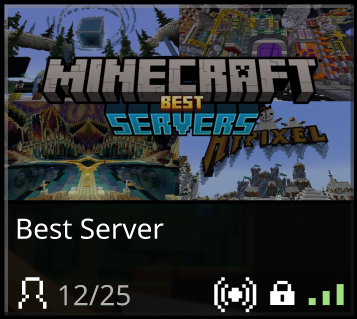
Some servers can be designated as broadcasted in the tenant settings. These broadcasted servers are shown by default in the grid of server tiles in the client's "Servers" menu. A broadcast icon, displayed to the left of the lock and server health icons, indicates that a server is broadcasted.
In contrast, non-broadcasted servers must be added manually by the user using the "+ ADD SERVER" button:
To display the full list of visible servers, the client performs the following steps:
client/fetch_broadcasted_servers endpoint to retrieve all broadcasted server IDs for the tenant.client/check_server_access endpoint.client/fetch_server_info endpoint with the combined list of server IDs to retrieve the data needed to display each server in the "Servers" menu.Example request:
{
    "method": "GET",
    "endpoint": "/client/fetch_broadcasted_servers",
    "headers": {
        "Host": "https://dedicatedserver.minecrafteduservices.com",
        "Authorization": "Bearer {Entra Access Token}" // Replace {Entra Access Token} with yours
    }
}
Example 200 response:
{
    "response_code": "200",
    "headers": {},
    "body": {
        "serverIdList": [ // May also be empty in 200 responses
            "US8IO2XK5AHF", // <string - Server ID> The globally unique 12 digit alphanumeric case-insensitive ID of the server (conventionally written with uppercase letters for consistency)
            "0LPN6Z208PHE"
        ]
    }
}400 - Request was malformed.
Additional details may be provided in the response, such as a required field being missing.
401 - Invalid token.
You aren't authenticated to call MESS. The token required may be a server token or an Entra token, depending on the endpoint you are calling. Additionally, the app ID required for acquiring the token also depends on the endpoint you are calling. Use the MCEDU client app id for server/register and the admin tooling app id for the tooling/ endpoints.
403 - Dedicated Server is not enabled for this tenant.
A user with access will need to call the tooling/edit_tenant_info endpoint to enable the feature.
The client can retrieve status details for any number of servers using the client/fetch_server_info endpoint. This endpoint may be called at any of the following times:
client/fetch_broadcasted_servers endpoint, andclient/check_server_access endpoint).
Example request:
{
    "method": "POST",
    "endpoint": "/client/fetch_server_info",
    "headers": {
        "Host": "https://dedicatedserver.minecrafteduservices.com",
        "Authorization": "Bearer {Entra Access Token}" // Replace {Entra Access Token} with yours
    },
    "body": {
        "serverIds": [
            "OHMNTT69T7XH", // <string - Server ID> The globally unique 12 digit alphanumeric case-insensitive ID of the server (conventionally written with uppercase letters for consistency)
            "QH2JNJUZY7YX"
        ]
    }
}
Example 200 response:
{
    "response_code": "200",
    "headers": {},
    "body": {
        "serverInfoDictionary": {
            "OHMNTT69T7XH": {
                "serverName": "Lorenzo's Cool Arctic Dreamhouse", // <string> The name that will be displayed on the server tile in the client's "Servers" menu
                "playerCount": 3, // <int> in range [0, maxPlayers]
                "maxPlayers": 25, // <int> in range [playerCount, INT_MAX]
                "health": 1, // <int> in range [0, 3] representing `Offline`, `Poor`, `Mid`, or `Good`
                "isBroadcasted": true, // <bool> Broadcasted servers are shown by default in the grid of server tiles in the client's "Servers" menu
                "isPasswordProtected": false, // <bool> Passwords are shared for all tenants, but can only be added or removed by the owning tenant
                "isOwningTenant": true, // <bool> If false, the server was shared with this tenant by the owning tenant
                "isEnabled": true, // <bool> If false, the tile will display as disabled in the client and will not be joinable
                "isSharingEnabled": true // <bool> If false, the share button will not be shown on the server tile in the client's "Servers" menu
            },
            "QH2JNJUZY7YX": {
                "serverName": "Michelle's Hot Desert Dreamhouse",
                "playerCount": 2,
                "maxPlayers": 25,
                "health": 3,
                "isBroadcasted": false,
                "isPasswordProtected": false,
                "isOwningTenant": true,
                "isEnabled": false,
                "isSharingEnabled": true
            }
        }
    }
}If the caller only has access to some and not all of the server registrations for the provided server IDs, then inaccessible ones will be omitted and a 206 partial success result will be returned.
Example 206 response:
{
    "response_code": "206",
    "headers": {},
    "body": {
        "serverInfoDictionary": {
            "OHMNTT69T7XH": {
                "serverName": "Lorenzo's Cool Arctic Dreamhouse", // <string> The name that will be displayed on the server tile in the client's "Servers" menu
                "playerCount": 3, // <int> in range [0, maxPlayers]
                "maxPlayers": 25, // <int> in range [playerCount, INT_MAX]
                "health": 0, // <int> in range [0, 3] representing `Offline`, `Poor`, `Mid`, or `Good`
                "isBroadcasted": true, // <bool> Broadcasted servers are shown by default in the grid of server tiles in the client's "Servers" menu
                "isPasswordProtected": false, // <bool> Passwords are shared for all tenants, but can only be added or removed by the owning tenant
                "isOwningTenant": true, // <bool> If false, the server was shared with this tenant by the owning tenant
                "isEnabled": true, // <bool> If false, the tile will display as disabled in the client and will not be joinable
                "isSharingEnabled": true // <bool> If false, the share button will not be shown on the server tile in the client's "Servers" menu
            }
        }
    }
}400 - Request was malformed.
Additional details may be provided in the response, such as a required field being missing.
401 - Invalid token.
You aren't authenticated to call MESS. The token required may be a server token or an Entra token, depending on the endpoint you are calling. Additionally, the app ID required for acquiring the token also depends on the endpoint you are calling. Use the MCEDU client app id for server/register and the admin tooling app id for the tooling/ endpoints.
404 - Resource(s) not found.
404 - Server(s) not found.
404 - Tenant-specific server information not found.
While the resource may exist, you don't have the resource in your tenant. For example, if another tenant owns a server, but you don't have a guest registration in your tenant.
500 - Internal server error.
Additional info may be provided on the failure, but try calling again.
When the user clicks the "PLAY" button on a server tile in the "Servers" screen, the client begins the join flow.
client/join_server endpoint to request a connection from MESS.joinerToHostNonce provided in the response.hostToJoinerNonce for later validation.During the handshake phase:
joinerToHostNonce sent by the client matches the one the server received from MESS.hostToJoinerNonce sent by the server matches the one the client received from MESS.The password field must be encrypted using the public key retrieved from the public_keys/encryption endpoint and then base64 encoded.
Example request:
{
    "method": "POST",
    "endpoint": "/client/join_server",
    "headers": {
        "Host": "https://dedicatedserver.minecrafteduservices.com",
        "Authorization": "Bearer {Entra Access Token}" // Replace {Entra Access Token} with yours
    },
    "body": {
        "serverId": "6VQEFN5BNSGC", // <string - Server ID> The globally unique 12 digit alphanumeric case-insensitive ID of the server (conventionally written with uppercase letters for consistency)
        "password": <encrypted password> // <string?> Optional, only required if the server is password protected
    }
}
Example 200 response:
{
    "response_code": "200",
    "headers": {},
    "body": {
        "connectionInfo": {
            "transportType": 0, // <int> Internal meaning and will change in the future
            "transportInfo": {
                "ip": "192.168.1.1:25565", // <string - IP, optionally including port> The IP address the joiner should use to connect to the host machine
            }
        },
        "sessionToken": <session token>, // <string - Session Token> Uniquely identifies the join operation so the host can map the client's session to the nonce pair
        "joinerToHostNonce": "8a2cbf5c-311c-48a5-b990-38cc6bd88afc", // <string - UUIDv4 Nonce> Sent by the joiner to the host as expected proof the joiner got it from MESS
        "hostToJoinerNonce": "d54225f7-9e9a-4a4c-9c71-358a14ecef9e", // <string - UUIDv4 Nonce> Sent by the host to the joiner as expected proof the host got it from MESS
    }
}400 - Unable to decrypt the password.
400 - Server is disabled. Enable server before use.
400 - Request was malformed.
Additional details may be provided in the response, such as a required field being missing.
401 - Invalid token.
You aren't authenticated to call MESS. The token required may be a server token or an Entra token, depending on the endpoint you are calling. Additionally, the app ID required for acquiring the token also depends on the endpoint you are calling. Use the MCEDU client app id for server/register and the admin tooling app id for the tooling/ endpoints.
403 - Missing or incorrect password.
404 - Server(s) not found.
404 - Tenant-specific server information not found.
While the resource may exist, you don't have the resource in your tenant. For example, if another tenant owns a server, but you don't have a guest registration in your tenant.
404 - Server hosting information not found. Server may not be online.
To bring the server back online, the server needs to call the server/host endpoint.
server/register) Refresh(
server/refresh_token) Fetch(
server/fetch_token) Host(
server/host) Update(
server/update) Joiner(
server/fetch_joiner_info) Dehost(
server/dehost) subgraph Spin-up Start --> New New -->|Yes| Register --> Auth New -->|No| Auth end subgraph Auth Cycle Auth --> Expired Expired -->|Yes| Fetch --> Auth Expired -->|No| Stale Stale -->|Yes| Refresh --> Auth Stale -->|No| Wait --> Refresh end subgraph Game Cycle Auth ==>|While Authed| Game Game -->|Ready To Play| Host Host -->|Share Status| Update -->|On Status Changed| Update Host -->|Accept Connections| Joiner -->|Repeat Periodically| Joiner Host -->|Closing Server| Dehost --> End end
After a successful call to the server/host endpoint, the dedicated server should gracefully shut down by calling the server/dehost endpoint, which marks the server registration as offline.
If the server shuts down without calling server/dehost, MESS will continue attempting to connect clients to it. However, if MESS receives no further communication from the server via server/host, server/fetch_joiner_info, or server/update within 1 hour, it will assume the server is unavailable (e.g., due to a crash or lost connectivity). At that point, MESS will stop routing clients to the server until a new server/host request is received.
This endpoint automatically sets the server health to 0.0f (default offline value signifying 0% healthy).
Example request:
{
    "method": "POST",
    "endpoint": "/server/dehost",
    "headers": {
        "Host": "https://dedicatedserver.minecrafteduservices.com",
        "Authorization": "Bearer {MESS Server Token}" // Replace {MESS Server Token} with the one most recently acquired via server/register or server/token_refresh
    }
}
Example 200 response:
{
    "response_code": "200",
    "headers": {},
    "body": {}
}400 - Request was malformed.
Additional details may be provided in the response, such as a required field being missing.
401 - Invalid token.
You aren't authenticated to call MESS. The token required may be a server token or an Entra token, depending on the endpoint you are calling. Additionally, the app ID required for acquiring the token also depends on the endpoint you are calling. Use the MCEDU client app id for server/register and the admin tooling app id for the tooling/ endpoints.
404 - Server(s) not found.
After a successful server/host endpoint call, the server should periodically call the server/fetch_joiner_info endpoint to check for clients attempting to join.
This exchange of joiner information is one half of the NAT punch-through process. The other half occurs when MESS returns the server's connection info (originally provided in the server/host endpoint request) to the client in the response to the client/join_server endpoint call.
By sharing each party's connection info, both the client and server can initiate communication, allowing them to punch through NAT restrictions, provided no firewall rules block the traffic.
During the handshake phase:
joinerToHostNonce sent by the client matches the one the server received from MESS.hostToJoinerNonce sent by the server matches the one the client received from MESS.Example request:
{
    "method": "GET",
    "endpoint": "/server/fetch_joiner_info",
    "headers": {
        "Host": "https://dedicatedserver.minecrafteduservices.com",
        "Authorization": "Bearer {MESS Server Token}" // Replace {MESS Server Token} with the one most recently acquired via server/register or server/token_refresh
    }
}
Example 200 response:
{
    "response_code": "200",
    "headers": {},
    "body": [ // May also be empty in 200 responses
        { // First joiner info
            "sessionToken": <session token>, // <string - Session Token> Uniquely identifies the join operation so the host can map the client's session to the nonce pair
            "joinerToHostNonce": "8a2cbf5c-311c-48a5-b990-38cc6bd88afc", // <string - UUIDv4 Nonce> Sent by the joiner to the host as expected proof the joiner got it from MESS
            "hostToJoinerNonce": "d54225f7-9e9a-4a4c-9c71-358a14ecef9e", // <string - UUIDv4 Nonce> Sent by the host to the joiner as expected proof the host got it from MESS
        },
        { // Second joiner info
            "sessionToken": <session token>,
            "joinerToHostNonce": "3157ecef-bd54-4d68-9cc6-ee13535c2924",
            "hostToJoinerNonce": "2428f2a5-0ad4-4746-b1c5-630adc7171eb",
        }
    ]
}400 - Request was malformed.
Additional details may be provided in the response, such as a required field being missing.
401 - Invalid token.
You aren't authenticated to call MESS. The token required may be a server token or an Entra token, depending on the endpoint you are calling. Additionally, the app ID required for acquiring the token also depends on the endpoint you are calling. Use the MCEDU client app id for server/register and the admin tooling app id for the tooling/ endpoints.
404 - Server hosting information not found. Server may not be online.
To bring the server back online, the server needs to call the server/host endpoint.
After calling the server/register endpoint, the dedicated server caches the MESS server token to disk. If the server goes offline or shuts down before refreshing the token via the server/refresh_token endpoint, it can obtain a new one using the server/fetch_token endpoint.
To fetch a new token, the server must provide a valid Entra token and the server ID of a registration owned by the caller's tenant. MESS will return a new server token, which can then be used for subsequent server/... endpoint calls.
Server token expiration dates are in UTC time.
Example request:
{
    "method": "GET",
    "endpoint": "/server/fetch_token",
    "headers": {
        "Host": "https://dedicatedserver.minecrafteduservices.com",
        "X-Request-ID": "044918a2-e33a-4461-85a9-37d2f3ee9d42", // <string> Can be any string, but should be unique for each request, so in practice is a random UUIDv4
        "Authorization": "Bearer {Entra Access Token}" // Replace {Entra Access Token} with yours
    },
    "parameters": {
        "serverId": "6VQEFN5BNSGC" // <string - Server ID> The globally unique 12 digit alphanumeric case-insensitive ID of the server (conventionally written with uppercase letters for consistency)
    }
}
Example 200 response:
{
    "response_code": "200",
    "headers": {},
    "body": <string - JWT> // Contains "serverToken": <string>
}400 - Request was malformed.
Additional details may be provided in the response, such as a required field being missing.
401 - Invalid token.
You aren't authenticated to call MESS. The token required may be a server token or an Entra token, depending on the endpoint you are calling. Additionally, the app ID required for acquiring the token also depends on the endpoint you are calling. Use the MCEDU client app id for server/register and the admin tooling app id for the tooling/ endpoints.
403 - Dedicated Server is not enabled for this tenant.
A user with access will need to call the tooling/edit_tenant_info endpoint to enable the feature.
403 - Server is not available in your tenant.
404 - Server(s) not found.
After launch, once the dedicated server has obtained a valid MESS server token, whether via server/register, server/refresh_token, or server/fetch_token, and has finished loading the world, it must call the server/host endpoint to notify MESS that it is ready to accept client connections.
This endpoint automatically sets the server health to 1.0f (default online value signifying 100% fully healthy). The server health is further updated in the server/update endpoint.
Calling server/host multiple times is allowed and will still succeed if the server is already active.
This behavior is intentional. MESS always uses the most recent IP and connection data provided by the server. Repeated calls to server/host allow the system to keep that information up to date (for example, if the server were to close and reopen on another VM with a new IP).
Example request:
{
    "method": "POST",
    "endpoint": "/server/host",
    "headers": {
        "Host": "https://dedicatedserver.minecrafteduservices.com",
        "Authorization": "Bearer {MESS Server Token}" // Replace {MESS Server Token} with the one most recently acquired via server/register or server/token_refresh
    },
    "body": {
        "connectionInfo": {
            "transportType": 0, // <int> Internal meaning and will change in the future
            "transportInfo": {
                "ip": "192.168.1.1:25565", // <string - IP, optionally including port> The IP address the joiner should use to connect to the host machine
            }
        }
    }
}
Example 200 response:
{
    "response_code": "200",
    "headers": {},
    "body": {}
}400 - Unsupported transport type.
400 - IpAddress information incomplete.
400 - Request was malformed.
Additional details may be provided in the response, such as a required field being missing.
401 - Invalid token.
You aren't authenticated to call MESS. The token required may be a server token or an Entra token, depending on the endpoint you are calling. Additionally, the app ID required for acquiring the token also depends on the endpoint you are calling. Use the MCEDU client app id for server/register and the admin tooling app id for the tooling/ endpoints.
404 - Server(s) not found.
After calling the server/register endpoint, the dedicated server caches the MESS server token to disk. If the token is still valid, the server can use the server/refresh_token endpoint to obtain a new one. Given a valid MESS server token, MESS will return a refreshed token that can be used for subsequent server/... endpoint calls.
Server token expiration dates are in UTC time.
Example request:
{
    "method": "POST",
    "endpoint": "/server/token_refresh",
    "headers": {
        "Host": "https://dedicatedserver.minecrafteduservices.com",
        "X-Request-ID": "044918a2-e33a-4461-85a9-37d2f3ee9d42", // <string> Can be any string, but should be unique for each request, so in practice is a random UUIDv4
        "Authorization": "Bearer {MESS Server Token}" // Replace {MESS Server Token} with the one most recently acquired via server/register or server/token_refresh
    }
}
Example 200 response:
{
    "response_code": "200",
    "headers": {},
    "body": <string - JWT> // Contains "serverToken": <string>
}400 - Request was malformed.
Additional details may be provided in the response, such as a required field being missing.
401 - Invalid token.
You aren't authenticated to call MESS. The token required may be a server token or an Entra token, depending on the endpoint you are calling. Additionally, the app ID required for acquiring the token also depends on the endpoint you are calling. Use the MCEDU client app id for server/register and the admin tooling app id for the tooling/ endpoints.
This is the first call in the server flow. Given a valid Entra token, MESS returns a server token and a globally unique server ID, which are required for all subsequent server/... calls.
Server token expiration dates are in UTC time.
When this call succeeds, MESS creates a new server registration and assigns ownership to the caller's tenant.
New registrations are disabled by default, meaning the tooling/edit_server_info endpoint must be called to set the registration to enabled before clients can connect to the server. Additionally, server owners will likely want to customize the default values for the server's other properties, such as the server's name.
Although the registration is tenant-owned, the server ID is globally unique across all tenants. This uniqueness enables cross-tenant play, if that feature is enabled.
Here in server/register, the response JWT contains both the serverToken and the serverId fields. However, in both server/refresh_token and server/fetch_token, the response JWT only contains the serverToken field and not the serverId field.
Example request:
{
    "method": "POST",
    "endpoint": "/server/register",
    "headers": {
        "Host": "https://dedicatedserver.minecrafteduservices.com",
        "X-Request-ID": "044918a2-e33a-4461-85a9-37d2f3ee9d42", // <string> Can be any string, but should be unique for each request, so in practice is a random UUIDv4
        "Authorization": "Bearer {Entra Access Token}" // Replace {Entra Access Token} with yours
    }
}
Example 200 response:
{
    "response_code": "200",
    "headers": {},
    "body": <string - JWT> // Contains "serverToken": <string>, "serverId": <string - Server ID>
}400 - Request was malformed.
Additional details may be provided in the response, such as a required field being missing.
401 - Invalid token.
You aren't authenticated to call MESS. The token required may be a server token or an Entra token, depending on the endpoint you are calling. Additionally, the app ID required for acquiring the token also depends on the endpoint you are calling. Use the MCEDU client app id for server/register and the admin tooling app id for the tooling/ endpoints.
403 - Dedicated Server is not enabled for this tenant.
A user with access will need to call the tooling/edit_tenant_info endpoint to enable the feature.
The server should use the server/update endpoint to report its status to MESS. This status information is then relayed to clients viewing the server in their "Servers" menu.
The server/update endpoint should be called whenever a property that affects the client display changes. However, it should not be called excessively and should be throttled to a minimum of 10 seconds between calls to avoid spamming.
A server with a health value of 0 is displayed in the client as offline. This can be used to customize the online and offline status displayed to clients independently of whether the server is actually running. Planned endpoints will make it possible to check whether a client is attempting to join an offline server so that the caller can run a server instance in response to the demand.
The values included in the body of this request are used by the client to display elements such as the "12" for playerCount, "25" for maxPlayers, and the full green bars representing health in the following example server tile.
Example request:
{
    "method": "POST",
    "endpoint": "/server/update",
    "headers": {
        "Host": "https://dedicatedserver.minecrafteduservices.com",
        "Authorization": "Bearer {MESS Server Token}" // Replace {MESS Server Token} with the one most recently acquired via server/register or server/token_refresh
    },
    "body": {
        "playerCount": 12, // <int?> in range [0, maxPlayers]
        "maxPlayers": 25, // <int?> in range [playerCount, INT_MAX]
        "health": 2, // <int> in range [0, 3] representing `Offline`, `Poor`, `Mid`, or `Good`
    }
}
Example 200 response:
{
    "response_code": "200",
    "headers": {},
    "body": {}
}400 - Request was malformed.
Additional details may be provided in the response, such as a required field being missing.
401 - Invalid token.
You aren't authenticated to call MESS. The token required may be a server token or an Entra token, depending on the endpoint you are calling. Additionally, the app ID required for acquiring the token also depends on the endpoint you are calling. Use the MCEDU client app id for server/register and the admin tooling app id for the tooling/ endpoints.
404 - Server(s) not found.
Tenant admins can optionally delegate limited management capabilities to other tenants by configuring partner relationships using the tooling/edit_tenant_settings endpoint. By default, no partners are defined, and each tenant retains full and exclusive control over their own configuration.
When a partner relationship is established, the partner tenant gains restricted access to certain resources and settings belonging to the owning tenant, depending on context.
FullManagement partner, specified with 0, can view and edit all tenant settings except partner permissions.ESports partner, specified with 1, can view and edit all tenant settings except partner permissions and teacher permissions.tooling/accept_server_invite: Used by the guest tenant to accept a server invite (only works if the crossTenantAllowed tenant setting in the owning and guest tenants and the crossTenantAllowed server setting in the owning tenant are set to true). Partners can accept on behalf of other tenants if the partner is the owner of the server registration.tooling/delete_server_registration: Lets a partner delete tenant-specific server registration information, but only if the partner is the owner of the server.tooling/edit_server_info: Lets a partner edit info for servers they are authorized to access (e.g., server name).tooling/edit_tenant_settings: Lets a partner edit all settings except the ones specifically mentioned above.tooling/fetch_server_info: Lets a partner fetch info for servers they are authorized to access.tooling/fetch_tenant_settings: Lets a partner view all settings except the ones specifically mentioned above.Tenant admins can use the tooling/accept_server_invite endpoint to accept a server registration invitation sent from another tenant. Once accepted, the invited tenant gains guest access to the specified server registration and can use it within their environment, subject to the permissions defined by the owning tenant.
This endpoint only works if the crossTenantAllowed tenant setting in the owning and guest tenants and the crossTenantAllowed server setting in the owning tenant are set to true.
Only tenant admins can designate another tenant as a managing partner and partner tenants have limited access and control. See the Partner access section for more details.
Example request:
{
    "method": "POST",
    "endpoint": "/tooling/accept_server_invite",
    "headers": {
        "Host": "https://dedicatedserver.minecrafteduservices.com",
        "Authorization": "Bearer {Entra Access Token}" // Replace {Entra Access Token} with yours
    },
    "parameters": {
        "onBehalfOfTenantId": "8f7aa7ad-8188-4051-aa33-4dfb400c0f55" // <string? - UUIDv4 Tenant ID> Optional, and if provided, applies the request to the provided target tenant, rather than the tenant of the calling user
    },
    "body": {
        "serverId": "6VQEFN5BNSGC" // <string - Server ID> The globally unique 12 digit alphanumeric case-insensitive ID of the server (conventionally written with uppercase letters for consistency)
    }
}
Example 200 response:
{
    "response_code": "200",
    "headers": {},
    "data": {}
}400 - Invalid tenantId entered.
400 - Request was malformed.
Additional details may be provided in the response, such as a required field being missing.
400 - Cross-tenant is not enabled for this server.
400 - Cross-tenant is not enabled for this tenant.
401 - Invalid token.
You aren't authenticated to call MESS. The token required may be a server token or an Entra token, depending on the endpoint you are calling. Additionally, the app ID required for acquiring the token also depends on the endpoint you are calling. Use the MCEDU client app id for server/register and the admin tooling app id for the tooling/ endpoints.
403 - Must be server owner to perform request.
403 - Requires admin-level permissions.
The user doesn't have permission to register a server. One of the following is true:
403 - Insufficient partner permissions.
The user does not have the partner role necessary to configure the given server of the target tenant.
404 - Server invite not found.
404 - Server(s) not found.
Tenant admins can use the tooling/create_server_invite endpoint to invite another tenant to join a specific server registration as a guest. The invited tenant gains limited access to the server registration and can use it within their own environment.
This endpoint requires that the owning tenant has the crossTenantAllowed tenant and server settings enabled.
Guest tenants can override only the serverName and toggle the server on or off for their own tenant. However, if the owning tenant disables the server, it is disabled for all tenants, including guests.
Example request:
{
    "method": "POST",
    "endpoint": "/tooling/create_server_invite",
    "headers": {
        "Host": "https://dedicatedserver.minecrafteduservices.com",
        "Authorization": "Bearer {Entra Access Token}" // Replace {Entra Access Token} with yours
    },
    "body": {
        "serverId": "6VQEFN5BNSGC", // <string - Server ID> The ID of the owned server to which the invited tenant will have guest access
        "guestTenantIds": [ // <list<string - UUIDv4 Tenant ID>> The IDs of the tenants that will be granted guest access to the specified server
            "8f7aa7ad-8188-4051-aa33-4dfb400c0f55"
        ]
    }
}
Example 200 response:
{
    "response_code": "200",
    "headers": {},
    "data": {}
}400 - Invalid tenantId entered.
400 - Request was malformed.
Additional details may be provided in the response, such as a required field being missing.
400 - Cross-tenant is not enabled for this tenant.
401 - Invalid token.
You aren't authenticated to call MESS. The token required may be a server token or an Entra token, depending on the endpoint you are calling. Additionally, the app ID required for acquiring the token also depends on the endpoint you are calling. Use the MCEDU client app id for server/register and the admin tooling app id for the tooling/ endpoints.
403 - Requires admin-level permissions.
The user doesn't have permission to register a server. One of the following is true:
403 - Insufficient partner permissions.
The user does not have the partner role necessary to configure the given server of the target tenant.
404 - Server(s) not found.
409 - Invite already sent.
Tenant admins should use the tooling/delete_server_registration endpoint to permanently remove server registrations that are no longer needed. If the deleted registration is the owning registration, all guest registrations associated with it will also be removed. Because of this, the endpoint should be used with caution.
If a server instance previously acquired a server ID via server/register, and the owning server registration for that ID is later deleted using tooling/delete_server_registration, the cached server ID stored on disk, typically located next to the server executable, must also be manually deleted to trigger a call to server/register.
If there is a chance the server may be needed again in the future, consider disabling the registration using the tooling/edit_server_info endpoint instead.
Example request:
{
    "method": "POST",
    "endpoint": "/tooling/delete_server_registration",
    "headers": {
        "Host": "https://dedicatedserver.minecrafteduservices.com",
        "Authorization": "Bearer {Entra Access Token}" // Replace {Entra Access Token} with yours
    },
    "body": {
        "serverId": "6VQEFN5BNSGC" // <string - Server ID> The globally unique 12 digit alphanumeric case-insensitive ID of the server (conventionally written with uppercase letters for consistency)
    }
}
Example 200 response:
{
    "response_code": "200",
    "headers": {},
    "data": {}
}It is also possible to receive a 204 or 206 response, both of which are successes, but with different internal meanings.
400 - Invalid tenantId entered.
400 - Request was malformed.
Additional details may be provided in the response, such as a required field being missing.
401 - Invalid token.
You aren't authenticated to call MESS. The token required may be a server token or an Entra token, depending on the endpoint you are calling. Additionally, the app ID required for acquiring the token also depends on the endpoint you are calling. Use the MCEDU client app id for server/register and the admin tooling app id for the tooling/ endpoints.
403 - Requires admin-level permissions.
The user doesn't have permission to register a server. One of the following is true:
500 - Internal server error.
Additional info may be provided on the failure, but try calling again.
After the server/register endpoint is called to set up a server, a tenant admin must use this endpoint to enable the server registration before clients are allowed to join.
The server's properties can be updated either individually or all at once in a single request.
The password field must be encrypted using the public key retrieved from the public_keys/encryption endpoint and then base64 encoded.
Only tenant admins can designate another tenant as a managing partner and partner tenants have limited access and control. See the Partner access section for more details.
Example request as the owning tenant:
{
    "method": "POST",
    "endpoint": "/tooling/edit_server_info",
    "headers": {
        "Host": "https://dedicatedserver.minecrafteduservices.com",
        "Authorization": "Bearer {Entra Access Token}" // Replace {Entra Access Token} with yours
    },
    "parameters": {
        "onBehalfOfTenantId": "8f7aa7ad-8188-4051-aa33-4dfb400c0f55" // <string? - UUIDv4 Tenant ID> Optional, and if provided, applies the request to the provided target tenant, rather than the tenant of the calling user
    },
    "body": {
        "serverId": "6VQEFN5BNSGC", // <string - Server ID> The globally unique 12 digit alphanumeric case-insensitive ID of the server (conventionally written with uppercase letters for consistency)
        "serverName": "Lorenzo's VERY Cool Artic Dreamhouse", // <string?> The name that will be displayed on the server tile in the client's "Servers" menu
        "enabled": true, // <bool?> If false, the tile will display as disabled in the client and will not be joinable
        "sharingEnabled": true, // <bool?> If false, the share button will not be shown on the server tile in the client's "Servers" menu
        "crossTenantAllowed": true, // <bool?> If false, guest tenants cannot join the server
        "isBroadcasted": true, // <bool?> Broadcasted servers are shown by default in the grid of server tiles in the client's "Servers" menu
        "disablePasswordProtection": true, // <bool?> If true, removes any password from the server
        "password": <encrypted password> // <string?> A password required to join for all tenants that have access to the server (cannot be provided if `disablePasswordProtection` is also provided and `true`)
    }
}
Example request as a guest tenant (a tenant that has accepted a server invite from the owning tenant):
{
    "method": "POST",
    "endpoint": "/tooling/edit_server_info",
    "headers": {
        "Host": "https://dedicatedserver.minecrafteduservices.com",
        "Authorization": "Bearer {Entra Access Token}" // Replace {Entra Access Token} with yours
    },
    "body": {
        "serverId": "6VQEFN5BNSGC", // <string - Server ID> The globally unique 12 digit alphanumeric case-insensitive ID of the server (conventionally written with uppercase letters for consistency)
        "serverName": "Lorenzo's VERY Cool Artic Dreamhouse", // <string?> The name that will be displayed on the server tile in the client's "Servers" menu
        "enabled": true, // <bool?> If false, the tile will display as disabled in the client and will not be joinable
        "sharingEnabled": true, // <bool?> If false, the share button will not be shown on the server tile in the client's "Servers" menu
        "isBroadcasted": true, // <bool?> Broadcasted servers are shown by default in the grid of server tiles in the client's "Servers" menu
    }
}
Example 200 response:
{
    "response_code": "200",
    "headers": {},
    "data": {}
}400 - Unable to decrypt the password.
400 - Invalid tenantId entered.
400 - Request was malformed.
Additional details may be provided in the response, such as a required field being missing.
401 - Invalid token.
You aren't authenticated to call MESS. The token required may be a server token or an Entra token, depending on the endpoint you are calling. Additionally, the app ID required for acquiring the token also depends on the endpoint you are calling. Use the MCEDU client app id for server/register and the admin tooling app id for the tooling/ endpoints.
403 - Requires admin-level permissions.
The user doesn't have permission to register a server. One of the following is true:
403 - Insufficient partner permissions.
The user does not have the partner role necessary to configure the given server of the target tenant.
404 - Server(s) not found.
404 - Tenant-specific server information not found.
While the resource may exist, you don't have the resource in your tenant. For example, if another tenant owns a server, but you don't have a guest registration in your tenant.
To use dedicated servers, tenant admins must first call this endpoint to enable the feature for their tenant. This endpoint allows tenant-specific configuration of dedicated server settings.
Two important fields in this request are upsertPartnerPermissions and onBehalfOfTenantId. The upsertPartnerPermissions field allows a tenant to specify partner tenants. The onBehalfOfTenantId field allows partner tenants to configure settings on tenants that have granted them permission.
By default, the dedicated server feature is completely disabled for all tenants. Likewise, no partner relationships are defined by default, meaning tenant admins have full and exclusive control over their own tenant's server configuration.
Admins can choose to delegate some of this control by enabling the feature and defining partner tenants. However, they should carefully consider the risks of exposing server configuration access to teachers or external partners.
The upsertPartnerPermissions and removePartnerPermissions properties must use the tenant IDs of server configuration partner who have been officially approved by Minecraft Education.
Only tenant admins can designate another tenant as a managing partner and partner tenants have limited access and control. See the Partner access section for more details.
Example request:
{
    "method": "POST",
    "endpoint": "/tooling/edit_tenant_settings",
    "headers": {
        "Host": "https://dedicatedserver.minecrafteduservices.com",
        "Authorization": "Bearer {Entra Access Token}" // Replace {Entra Access Token} with yours
    },
    "parameters": {
        "onBehalfOfTenantId": "8f7aa7ad-8188-4051-aa33-4dfb400c0f55" // <string? - UUIDv4 Tenant ID> Optional, and if provided, applies the request to the provided target tenant, rather than the tenant of the calling user
    },
    "body": {
        "addBroadcastedServers": [ // <list<string - Server ID>?> Makes the servers with the provided IDs show by default in clients of the tenant
            "QH2JNJUZY7YX" // <string - Server ID> The globally unique 12 digit alphanumeric case-insensitive ID of the server (conventionally written with uppercase letters for consistency)
        ],
        "removeBroadcastedServers": [ // <list<string - Server ID>?> Makes the servers with the provided IDs not show by default in clients of the tenant
            "OHMNTT69T7XH" // <string - Server ID> The globally unique 12 digit alphanumeric case-insensitive ID of the server (conventionally written with uppercase letters for consistency)
        ],
        "dedicatedServerEnabled": false, // <bool?> If false, users in the tenant will be unable to join servers or access the "Servers" menu in the client
        "teachersAllowed": true, // <bool?> If true, users with a faculty license to Minecraft Education in the tenant will be allowed to set up and configure dedicated servers (instead of only users with the Global Administrator role in Azure)
        "crossTenantAllowed": false, // <bool?> If false, guest tenants cannot join the server
        "upsertPartnerPermissions": {// <dict<string - UUIDv4 Tenant ID, int - Partner Permission Level>?> Allows the specified partner tenants to make edits to certain properties of the calling tenant
            // <string - UUIDv4 Partner Tenant ID> The tenant ID of a server configuration partner who has been officially approved by Minecraft Education
            "8f7aa7ad-8188-4051-aa33-4dfb400c0f55": 0, // <int - Partner permission level> 0 = FullManagement (can manage all tenant settings except partner permission edits), 1 = ESports (can set up connections and edit the broadcasted servers list only)
            "f7751dd5-2b0f-41e1-8228-446deac879f6": 1
        },
        "removePartnerPermissions": [// <list<string - UUIDv4 Tenant ID>?> Makes the partner tenants with the provided IDs unable to make edits to any properties of the calling tenant
            "8f7aa7ad-8188-4051-aa33-4dfb400c0f55" // <string - UUIDv4 Partner Tenant ID> The tenant ID of a server configuration partner who has been officially approved by Minecraft Education
        ]
    }
}
Example 200 response:
{
    "response_code": "200",
    "headers": {},
    "data": {}
}400 - Invalid tenantId entered.
400 - Request was malformed.
Additional details may be provided in the response, such as a required field being missing.
401 - Invalid token.
You aren't authenticated to call MESS. The token required may be a server token or an Entra token, depending on the endpoint you are calling. Additionally, the app ID required for acquiring the token also depends on the endpoint you are calling. Use the MCEDU client app id for server/register and the admin tooling app id for the tooling/ endpoints.
403 - Requires admin-level permissions.
The user doesn't have permission to register a server. One of the following is true:
403 - Insufficient partner permissions.
The user does not have the partner role necessary to configure the given server of the target tenant.
Tenant admins can use this endpoint to retrieve all server IDs associated with their tenant. This includes both owned registrations and guest registrations.
Example request:
{
    "method": "GET",
    "endpoint": "/tooling/fetch_all_server_ids",
    "headers": {
        "Host": "https://dedicatedserver.minecrafteduservices.com",
        "Authorization": "Bearer {Entra Access Token}" // Replace {Entra Access Token} with yours
    }
}
Example 200 response:
{
    "response_code": "200",
    "headers": {},
    "body": {
        "serverIdList": [ // May also be empty in 200 responses
            "US8IO2XK5AHF", // <string - Server ID> The globally unique 12 digit alphanumeric case-insensitive ID of the server (conventionally written with uppercase letters for consistency)
            "0LPN6Z208PHE"
        ]
    }
}400 - Request was malformed.
Additional details may be provided in the response, such as a required field being missing.
401 - Invalid token.
You aren't authenticated to call MESS. The token required may be a server token or an Entra token, depending on the endpoint you are calling. Additionally, the app ID required for acquiring the token also depends on the endpoint you are calling. Use the MCEDU client app id for server/register and the admin tooling app id for the tooling/ endpoints.
403 - Requires admin-level permissions.
The user doesn't have permission to register a server. One of the following is true:
Although the client/fetch_server_info and tooling/fetch_server_info endpoints return similar data, tooling/fetch_server_info is designed specifically for tenant admins and supports cross-tenant access, provided the caller is authorized.
This endpoint allows tenant admins to retrieve status details for any number of servers, including:
Only tenant admins can designate another tenant as a managing partner and partner tenants have limited access and control. See the Partner access section for more details.
Example request:
{
    "method": "POST",
    "endpoint": "/tooling/fetch_server_info",
    "headers": {
        "Host": "https://dedicatedserver.minecrafteduservices.com",
        "Authorization": "Bearer {Entra Access Token}" // Replace {Entra Access Token} with yours
    },
    "parameters": {
        "onBehalfOfTenantId": "8f7aa7ad-8188-4051-aa33-4dfb400c0f55" // <string? - UUIDv4 Tenant ID> Optional, and if provided, applies the request to the provided target tenant, rather than the tenant of the calling user
    },
    "body": {
        "serverIds": [
            "OHMNTT69T7XH", // <string - Server ID> The globally unique 12 digit alphanumeric case-insensitive ID of the server (conventionally written with uppercase letters for consistency)
            "QH2JNJUZY7YX"
        ]
    }
}
Example 200 response:
{
    "response_code": "200",
    "headers": {},
    "body": {
        "serverInfoDictionary": {
            "OHMNTT69T7XH": { <string - Server ID> The globally unique 12 digit alphanumeric case-insensitive ID of the server (conventionally written with uppercase letters for consistency)
                "serverName": "Lorenzo's Cool Arctic Dreamhouse", // <string> The name that will be displayed on the server tile in the client's "Servers" menu
                "playerCount": 3, // <int> in range [0, maxPlayers]
                "maxPlayers": 25, // <int> in range [playerCount, INT_MAX]
                "health": 1, // <int> in range [0, 3] representing `Offline`, `Poor`, `Mid`, or `Good`
                "isBroadcasted": true, // <bool> Broadcasted servers are shown by default in the grid of server tiles in the client's "Servers" menu
                "isPasswordProtected": false, // <bool> Passwords are shared for all tenants, but can only be added or removed by the owning tenant
                "isOwningTenant": true, // <bool> If false, the server was shared with this tenant by the owning tenant
                "isEnabled": true, // <bool> If false, the tile will display as disabled in the client and will not be joinable
                "isSharingEnabled": true // <bool> If false, the share button will not be shown on the server tile in the client's "Servers" menu
            },
            "QH2JNJUZY7YX": {
                "serverName": "Michelle's Hot Desert Dreamhouse",
                "playerCount": 2,
                "maxPlayers": 25,
                "health": 2,
                "isBroadcasted": false,
                "isPasswordProtected": false,
                "isOwningTenant": true,
                "isEnabled": false,
                "isSharingEnabled": true
            }
        }
    }
}
Example 206 response:
{
    "response_code": "206",
    "headers": {},
    "body": {
        "serverInfoDictionary": {
            "QH2JNJUZY7YX": { <string - Server ID> The globally unique 12 digit alphanumeric case-insensitive ID of the server (conventionally written with uppercase letters for consistency)
                "serverName": "Michelle's Hot Desert Dreamhouse", // <string> The name that will be displayed on the server tile in the client's "Servers" menu
                "playerCount": 2, // <int> in range [0, maxPlayers]
                "maxPlayers": 25, // <int> in range [playerCount, INT_MAX]
                "health": 3, // <int> in range [0, 3] representing `Offline`, `Poor`, `Mid`, or `Good`
                "isBroadcasted": false, // <bool> Broadcasted servers are shown by default in the grid of server tiles in the client's "Servers" menu
                "isPasswordProtected": false, // <bool> Passwords are shared for all tenants, but can only be added or removed by the owning tenant
                "isOwningTenant": true, // <bool> If false, the server was shared with this tenant by the owning tenant
                "isEnabled": false, // <bool> If false, the tile will display as disabled in the client and will not be joinable
                "isSharingEnabled": true // <bool> If false, the share button will not be shown on the server tile in the client's "Servers" menu
            }
        }
    }
}400 - Invalid tenantId entered.
400 - Request was malformed.
Additional details may be provided in the response, such as a required field being missing.
401 - Invalid token.
You aren't authenticated to call MESS. The token required may be a server token or an Entra token, depending on the endpoint you are calling. Additionally, the app ID required for acquiring the token also depends on the endpoint you are calling. Use the MCEDU client app id for server/register and the admin tooling app id for the tooling/ endpoints.
403 - Requires admin-level permissions.
The user doesn't have permission to register a server. One of the following is true:
403 - Insufficient partner permissions.
The user does not have the partner role necessary to configure the given server of the target tenant.
403 - Must be server owner to perform request.
404 - Resource(s) not found.
404 - Server(s) not found.
404 - Tenant-specific server information not found.
While the resource may exist, you don't have the resource in your tenant. For example, if another tenant owns a server, but you don't have a guest registration in your tenant.
Admins can use this endpoint to view tenant settings for their own tenant. This endpoint can also be used to view the tenant settings of a given target tenant as long as the target tenant has granted partner access to the caller's tenant.
Only tenant admins can designate another tenant as a managing partner and partner tenants have limited access and control. See the Partner access section for more details.
Example request:
{
    "method": "GET",
    "endpoint": "/tooling/fetch_tenant_settings",
    "headers": {
        "Host": "https://dedicatedserver.minecrafteduservices.com",
        "Authorization": "Bearer {Entra Access Token}" // Replace {Entra Access Token} with yours
    },
    "parameters": {
        "onBehalfOfTenantId": "8f7aa7ad-8188-4051-aa33-4dfb400c0f55" // <string? - UUIDv4 Tenant ID> Optional, and if provided, applies the request to the provided target tenant, rather than the tenant of the calling user
    }
}
Example 200 response:
{
    "response_code": "200",
    "headers": {},
    "body": {
        "broadcastedServers": [ // May also be empty in 200 responses
            "US8IO2XK5AHF", // <string - Server ID> The globally unique 12 digit alphanumeric case-insensitive ID of the server (conventionally written with uppercase letters for consistency)
            "0LPN6Z208PHE"
        ],
        // This is where the body ends for partners who can only edit the broadcasted servers list
        "dedicatedServerEnabled": true, // <bool> If false, users in the tenant will be unable to join servers or access the "Servers" menu in the client
        "crossTenantAllowed": true, // <bool> If false, guest tenants cannot join the server
        // This is where the body ends for partners who can also edit basic tenant settings
        "serverInvitesSent": {
            // <string - UUIDv4 Partner Tenant ID> The tenant ID of a server configuration partner who has been officially approved by Minecraft Education
            "8f7aa7ad-8188-4051-aa33-4dfb400c0f55": "US8IO2XK5AHF", // <string - Server ID> The globally unique 12 digit alphanumeric case-insensitive ID of the server (conventionally written with uppercase letters for consistency)
            "f7751dd5-2b0f-41e1-8228-446deac879f6": "0LPN6Z208PHE"
        },
        "serverInvitesReceived": [
            "US8IO2XK5AHF" // <string - Server ID> The globally unique 12 digit alphanumeric case-insensitive ID of the server (conventionally written with uppercase letters for consistency)
        ],
        // This is where the body ends for partners who can also create guest tenant connections for servers
        "teachersAllowed": false, // <bool> If true, users with a faculty license to Minecraft Education in the tenant will be allowed to set up and configure dedicated servers (instead of only users with the Global Administrator role in Azure)
        "partnerPermissions": {
            // <string - UUIDv4 Partner Tenant ID> The tenant ID of a server configuration partner who has been officially approved by Minecraft Education
            "8f7aa7ad-8188-4051-aa33-4dfb400c0f55": 0, // <int - Partner permission level> 0 = FullManagement (can manage all tenant settings except partner permission edits), 1 = ESports (can set up connections and edit the broadcasted servers list only)
        }
        // This is where the body ends for owners
    }
}400 - Invalid tenantId entered.
400 - Request was malformed.
Additional details may be provided in the response, such as a required field being missing.
401 - Invalid token.
You aren't authenticated to call MESS. The token required may be a server token or an Entra token, depending on the endpoint you are calling. Additionally, the app ID required for acquiring the token also depends on the endpoint you are calling. Use the MCEDU client app id for server/register and the admin tooling app id for the tooling/ endpoints.
403 - Requires admin-level permissions.
The user doesn't have permission to register a server. One of the following is true:
403 - Insufficient partner permissions.
The user does not have the partner role necessary to configure the given server of the target tenant.
Tenant admins can use the tooling/remove_server_connection endpoint to remove a server registration connection between their tenant and another tenant. This endpoint supports two scenarios:
If the calling tenant is the owner, they can remove pending invites they previously sent. If the calling tenant is the guest, they can remove their own access, including pending invites.
This operation effectively revokes guest access to the server for the specified tenant, whether the connection was pending or active.
Example request:
{
    "method": "POST",
    "endpoint": "/tooling/remove_server_connection",
    "headers": {
        "Host": "https://dedicatedserver.minecrafteduservices.com",
        "Authorization": "Bearer {Entra Access Token}" // Replace {Entra Access Token} with yours
    },
    "body": {
        "serverId": "OHMNTT69T7XH", // <string - Server ID> The ID of the server for which access is being revoked
        "guestTenantIds": [ // <list<string - UUIDv4 Tenant ID>>? Only valid if the caller's tenant owns the server, in which case this is the IDs of the tenants whose guest access will be revoked. If omitted, the caller's tenant must be a guest of the server and the caller's tenant will revoke its own guest access.
            "8f7aa7ad-8188-4051-aa33-4dfb400c0f55"
        ]
    }
}
Example 200 response:
{
    "response_code": "200",
    "headers": {},
    "body": {}
}400 - Invalid tenantId entered.
400 - Request was malformed.
Additional details may be provided in the response, such as a required field being missing.
401 - Invalid token.
You aren't authenticated to call MESS. The token required may be a server token or an Entra token, depending on the endpoint you are calling. Additionally, the app ID required for acquiring the token also depends on the endpoint you are calling. Use the MCEDU client app id for server/register and the admin tooling app id for the tooling/ endpoints.
403 - Requires admin-level permissions.
The user doesn't have permission to register a server. One of the following is true:
404 - Resource(s) not found.
404 - Server(s) not found.
404 - Tenant-specific server information not found.
While the resource may exist, you don't have the resource in your tenant. For example, if another tenant owns a server, but you don't have a guest registration in your tenant.
Clients and servers can call this endpoint to retrieve the current MESS public key used for encrypting sensitive data, such as passwords. This key uses the RSA 2048 OAEP-SHA256 encryption scheme and ensures that data sent to MESS is securely protected during transmission.
The password field must be encrypted using the public key retrieved from the public_keys/encryption endpoint and then base64 encoded.
Example request:
{
    "method": "GET",
    "endpoint": "/public_keys/encryption",
    "headers": {
        "Host": "https://dedicatedserver.minecrafteduservices.com"
    }
}
Example 200 response:
{
    "response_code": "200",
    "headers": {},
    "body": [ // <list<string - PEM RSA Public Key>>
        "-----BEGIN PUBLIC KEY-----\nMIIBIjANBgkqhkiG9w0BAQEFAAOCAQ8AMIIBCgKCAQEAxMIvvHaUAHlaEOvwcL3OWocSIcMUuaMA\r\nfjnzV5PutTlV4ZroIoplED1wuCOuOYwojPqBJ67gEl6UXnbyl+QUzwzwmd90IulAqeggQ87BLuma\r\n1iQic2edVHCr15el1CFYeey8Wje1hrlMotUZAq6aZiwLuXmfJuu5iTetTKL1EMmo5045YXSecq1P\r\nqQQlE/wjQ6bYcSP3eP5w9Ja0Oi4c8xvMgoEDpS9rsaXCuaQSmX58iEhRBeCLKS0mQSh1R8zjYCBe\r\nyy2qMdZoiZwMLMuFDTsFqJUUJBATN6pzdmhfUA+ahXEzIWigIIA/2Yk2cAHwoL6h7k/c9eGujUhT\r\n8UQGhQIDAQAB\n-----END PUBLIC KEY-----\n"
    ]
}None
This endpoint returns the current MESS public key used to verify the digital signatures on MESS-issued server tokens. Clients and servers can use this key to validate the authenticity and integrity of these tokens during the join and host flows.
Example request:
{
    "method": "GET",
    "endpoint": "/public_keys/signing",
    "headers": {
        "Host": "https://dedicatedserver.minecrafteduservices.com"
    }
}
Example 200 response:
{
    "response_code": "200",
    "headers": {},
    "body": [ // <list<string - MESS Public Key>>
        "MIGfMA0GCSqGSIb3DQEBAQUAA4GNADCBiQKBgQDsFCr3nD8N3TJxJZ7Y4g1Z20Son+fUWTSd2f/XyIil2mGGGx/yjRj6l0ntbROsec8MZoaLsBG0nWm9/WhJcdXvJewbdd+mCyy7WXyYQgJcJPZP3kgBDySZMUnaowlUmR9gxRr+LevCafZKQwb19nwJB0EUt+nQsWBbTe2SuIdCqQIDAQAB"
    ]
}None